 Step 1: Enter your voucher code below

How to redeem a voucher code
- Enter your 1st voucher code.
- If you are redeeming more than one voucher codes, enter your 1st voucher code and then click Redeem Multiple Voucher Codes.
- Click the SUBMIT button.
- Enter your shipping information and email address, and then click the CONTINUE button.
- If applicable, select your product option(s), and then click the CONTINUE button.
- Confirm your order information such as product option(s), shipping information, and then click the PAY NOW button to pay for shipping and handling charges (if applicable).
- You will be directed to PayPals' secure checkout page where you can pay using your PayPal account or a credit card.
- If you are paying using PayPal, enter your PayPal email address and password.
- If you want to pay using a credit card, click the CONTINUE button under the "Don't have a PayPal account?"
- Enter your billing information and click SUBMIT.
- You will receive an order confirmation email from us and a payment receipt from PayPal.
- If you DO NOT receive an order confirmation email AND a payment receipt from PayPal, your order is not complete. Please contact us at noreply@optimusdatum.com.
Supported browsers
We support the following browsers:- Chrome
- Internet Explorer
- Firefox
If you are using a Smartphone/Apple, redemption may not work with the SAFARI BROWSER. Please try redeeming from a PC computer and one of the supported browsers. To install the Google Chrome browser go to https://www.google.com/intl/en/chrome/browser or to install the Firefox Browser go to http://www.firefox.com on your Apple.
Parcel Insurance
If for any reason your package gets lost in the mail or the item inside the package gets damaged we will replace your item and pay the shipping free of charge.
Expedited shipping
There may be thousands of packages scheduled to be shipped before yours. For a nominal fee, you may expedite your shipping and jump to the front of the line. On average this speeds up your delivery by about 2 weeks.
Shipping and handling charges
A shipping and handling charge will be applied to each voucher entered.
Invalid voucher code message
If an invalid voucher code message is displayed, it means one of the following:
- The voucher codes have not been uploaded to our system yet. Please check back in 24 hours to redeem.
- The voucher codes are CAPS SPECIFIC, PLEASE COPY EXACTLY WITH CAPITAL LETTERS IF NEEDED.
- Some characters can cause confusion, for example, the lower case letter "I", capital letter "I" can be confused with the number "1".
- The voucher code provided is incorrect. Please contact the Daily Deal site you purchased the voucher from to make sure it is correct.
- If 24 hours has passed and your codes are not working and you have contacted the Daily Deal site, please email noreply@optimusdatum.com.
I did not receive an order confirmation email
- Please check your spam folder for an order confirmation email; or
- If the order confirmation email is not in your spam folder, it means your voucher code did not get redeemed, please try again in a few minutes.
I did not receive a PayPal receipt
Your credit card did not get charged. Please resubmit your voucher again as the payment processing server may have timed out the transaction.
Disable cookies error message
If you are receiving an error message about disabled cookies, first, refresh your browser. If this does not work, please make sure your cookies are enabled on your browser. Click here for information on how to refresh your browser or on how to enable cookies.
Experiencing white screen after STEP 1
If you are experiencing a white screen after clicking the SUBMIT button:
- your browser may have scrolled to the bottom of the web page; using the scrollbar on the right side of your browser, scroll up to the top of the page; or
- try using one of our supported browsers; or
- your order is not complete, please try redeeming your voucher again in a few minutes.
If none of the above work, please try using another PC or Laptop (mobile devices such as tablets and smartphones are known to cause these issues).
If you are still having issues with redeeming your vouchers, please contact us at noreply@optimusdatum.com.
Your payment was declined error message
- Your order can be shipped to any shipping address you'd like, but the billing address must match the address on your credit card statements.
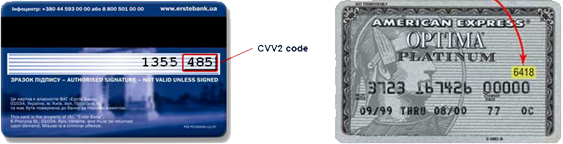
- Verify the correct credit card number, expiration date, and CVV2/CID code.
- Double check that the CVV2/CID code is correct.
Yahoo
Please check your "Bulk Mail" folder. If you find our email there, select the confirmation message and click
"Not Spam."
Gmail
Please check your "Spam" folder. If you find our email there, select the confirmation message and click
"Not Spam."
Hotmail
Please check your "Junk email" folder. If you find our email there, select the confirmation message and click
"Not Junk."
AOL
Please check your "Spam" folder. If you find our email there, select the confirmation message and
click "This is Not Spam."
Outlook 2003
- Select Actions from the top menu bar, then select Junk email followed by Junk email Options.
- Select Safe Senders, and thenAdd.
- Type noreply@optimusdatum.com and click OK.
- Type and click OK.
- Click OK.
Outlook 2007
- Log in to your Outlook account.
- Select Tools, and then select Options.
- On the Preferences tab, under E-mail, click Junk E-mail.
- Click the Safe Senders or Safe Recipients tab.
- Click Add.
- In the Enter an e-mail address or Internet domain name to be added to the list box, enter noreply@optimusdatum.com, and then click OK.
Mac Mail
- Open the email.
- Right-click the noreply@optimusdatum.com email address.
- Click Add to contacts in the short-cut menu.
- Click Save and Close.